

What is an AI Roblox UI generator?
An AI Roblox UI generator helps create interface concepts for Roblox and, when it includes reconstruction and export, turns those concepts into objects that can be edited in Roblox Studio.
Generic image generation ends with a picture. That picture can be useful for visual direction, but it does not contain selectable Frames, labels, buttons, positions, or parent-child relationships. A production workflow needs a second stage that interprets the visual result and builds an interface hierarchy.
GenGUI combines these stages in one workflow: concept generation, reconstruction, visual editing, and Roblox export. The exported model is still a starting point for implementation; game-specific behavior and secure server logic must be added in Studio.
How GenGUI works
The workflow moves from a written interface brief to a generated concept, then from that concept to editable Roblox UI objects.
- 1. Describe the screenName its purpose, content, controls, and visual direction in a prompt.
- 2. Add a reference if usefulAttach a PNG, JPEG, or WebP to guide palette and shape language.
- 3. Reconstruct the conceptUse a GenGUI workflow to separate and organize the visual result into layers.
- 4. Refine the hierarchySelect, move, resize, rename, and adjust reconstructed objects in the editor.
- 5. Export for StudioDownload .rbxmx and Luau output, with optional Open Cloud image-asset upload.
- 6. Connect game logicImport under StarterGui, test responsiveness, and script behavior securely.
For a detailed walkthrough, read how to generate Roblox UI with AI.
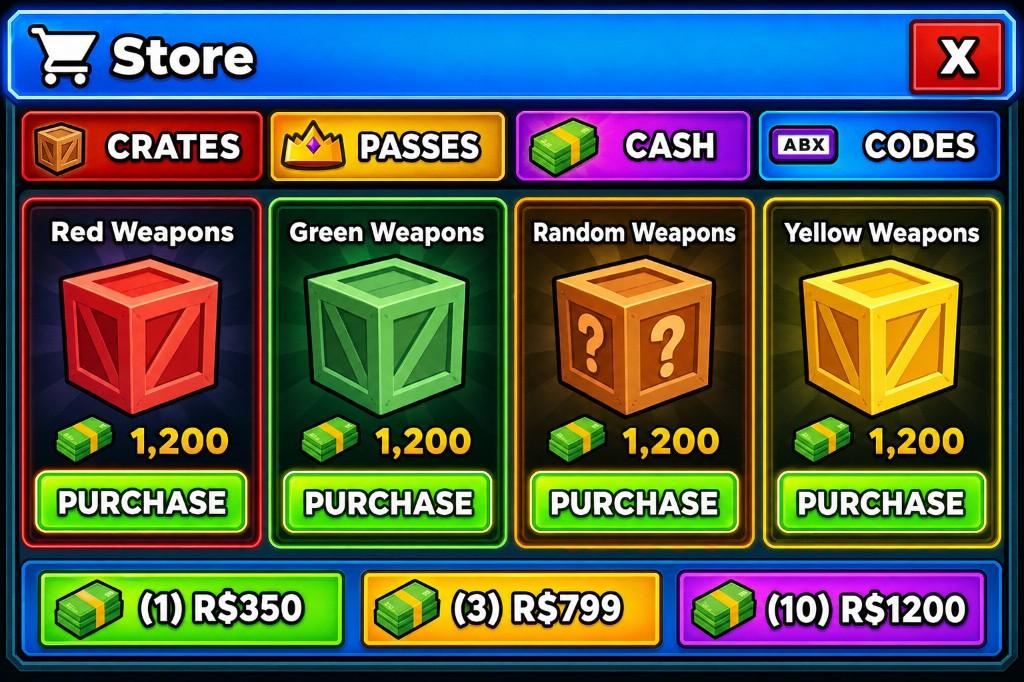
Does GenGUI create editable Roblox UI?
Yes. GenGUI reconstructs the concept into a hierarchy of interface objects that can be selected and changed, rather than exporting only one flattened screenshot.
Depending on the source and reconstruction workflow, the hierarchy can include containers, text objects, image objects, and buttons. You can adjust geometry, names, text, and layer organization before export. Image-backed artwork remains image-backed; editable does not mean every illustrated pixel becomes a native Roblox primitive.
The practical test is whether a runtime element needs to change independently. Prices, item names, selection states, and controls generally benefit from separate objects. Decorative artwork can remain an image when that is the simpler and more faithful representation.
Generated UI image vs. actual Roblox interface
A concept image communicates appearance. An interface hierarchy provides the structure needed for editing, scripting, and runtime updates.
| Capability | Flat UI image | Reconstructed hierarchy |
|---|---|---|
| Select individual elements | No | Yes, when reconstructed as separate objects |
| Change runtime text | No | Yes, for separate text objects |
| Attach button behavior | Not directly | Yes, after connecting scripts |
| Inspect parent-child structure | No | Yes |
| Use as visual reference | Yes | Yes |
| Requires implementation review | Yes | Yes |
How does the generated UI get into Roblox Studio?
Export the reconstructed tree as a .rbxmx model, import it into the target Studio project, place the ScreenGui under StarterGui, and connect image assets and scripts.
GenGUI can package the hierarchy as Roblox XML model data and also produces Luau output in supported export paths. For image-backed elements, you can download locally or use your own configured Roblox Open Cloud credentials to upload assets and connect their IDs.
After import, test ZIndex, clipping, text, aspect ratios, and all interaction states. GenGUI does not fabricate your game’s data layer: purchases, inventory changes, rewards, and privileged actions must be implemented and validated by your game code. See the Studio export guide for the full checklist.
What kinds of Roblox interfaces can you create?
GenGUI can support screens whose purpose and content can be described clearly, including shops, inventories, settings, battle passes, menus, quest panels, and admin-style tools.
The examples library documents existing shop, rebirth, settings, and admin-panel concepts. These examples show visual directions and interface elements; they do not imply that game logic is generated with the screen.
Who should use GenGUI?
GenGUI is intended for Roblox developers and teams that want help moving from an interface brief to an editable Studio artifact without manually recreating every visual layer from a concept image.
It is most useful when you can review a hierarchy, make design decisions, and finish the implementation in Studio. It does not replace knowledge of Roblox scripting, responsive layout, accessibility, or client/server security.
If you are deciding between AI assistance and a fully manual process, use the neutral AI versus manual Roblox UI comparison.
Common questions
GenGUI is a web-based AI Roblox UI generator. It combines prompt-based concept generation, interface reconstruction, visual editing, and Roblox Studio export.
AI can create a visual concept and help reconstruct it into Roblox UI objects. The hierarchy still needs human review, responsive testing, and game-specific scripting.
Yes, when the generated image is reconstructed into separate interface objects. In GenGUI, reconstructed layers can be selected and refined before export.
Yes. GenGUI accepts an optional PNG, JPEG, or WebP reference during generation to guide palette and shape language for a new interface.
Yes. GenGUI exports .rbxmx model data for import into Roblox Studio and can optionally upload image assets using the user's configured Roblox Open Cloud credentials.
In everyday Roblox development, UI and GUI are commonly used for the same on-screen interface systems. Roblox class names use “Gui,” as in ScreenGui and GuiObject.